
Introduction
In today’s interconnected world, networking is the backbone of almost everything we do online. From browsing websites to sending emails and joining video calls, data travels through complex paths to reach its destination. But how exactly does this happen?
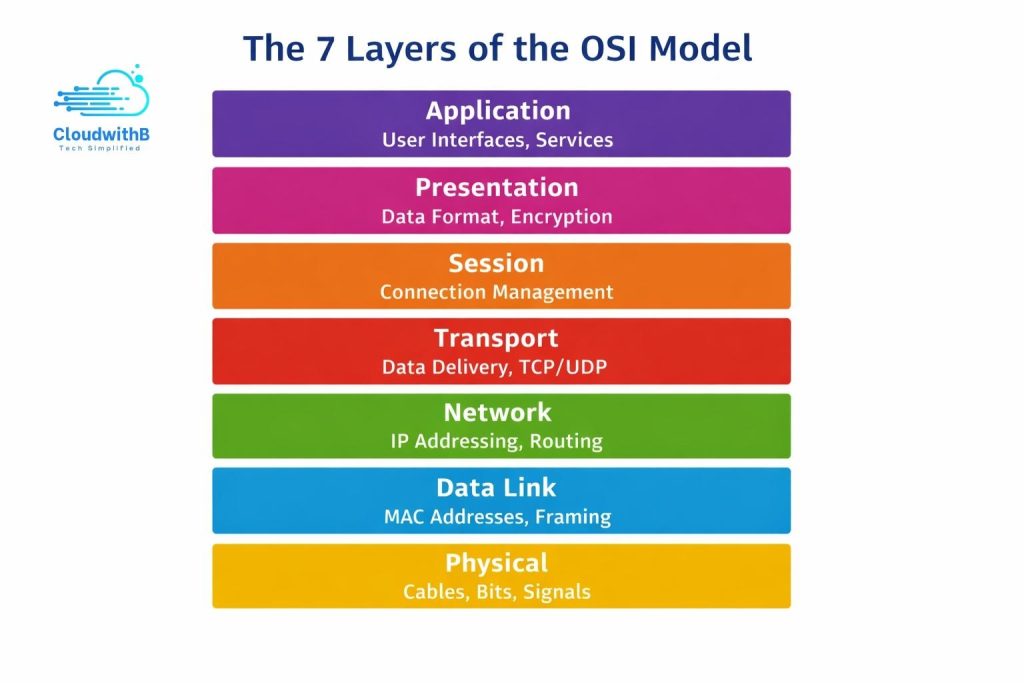
The OSI Model (Open Systems Interconnection Model) is a conceptual framework that helps us understand how data moves from one computer to another over a network. By breaking network communication into seven distinct layers, the OSI Model provides a roadmap for IT beginners to understand networking concepts, troubleshoot issues, and even prepare for advanced topics like cloud computing and cybersecurity.
This post will guide you through each layer, explain its role, and give practical examples that make the OSI Model easy to grasp.
The Seven Layers of the OSI Model
1. Physical Layer
Role: Responsible for the physical transmission of raw data bits over a network medium.
Examples: Ethernet cables, fiber optics, Wi-Fi signals.
Analogy: Think of it as the roads or wires through which data travels. Just like cars need roads to move, data needs the physical layer to reach the next layer.
2. Data Link Layer
Role: Handles error detection, frame synchronization, and local addressing using MAC addresses.
Examples: Switches operate primarily at this layer, ensuring data reaches the correct device within a local network.
Analogy: It’s like addressing a package before it’s sent to a neighbor — making sure it arrives at the correct home on your street.
3. Network Layer
Role: Responsible for logical addressing and routing, allowing data to travel across multiple neatworks.
Examples: Routers use IP addresses to determine the path data takes to reach its destination.
Analogy: This is the postal system that determines which city or region your package should go to.
4. Transport Layer
Role: Ensures reliable delivery of data, manages segmentation, and reassembles data packets.
Protocols: TCP (reliable, connection-oriented) and UDP (faster, connectionless).
Analogy: TCP is like a courier that confirms every package delivery, while UDP is like dropping postcards in a mailbox without delivery confirmation.
5. Session Layer
Role: Manages connections (sessions) between applications on different devices.
Examples: Logging into Zoom or a web portal maintains a session between your computer and the server.
Analogy: It’s like a conversation ID that ensures two parties can continue talking without confusion.
6. Presentation Layer
Role: Translates, encrypts, or compresses data so the application layer can read it.
Examples: Converting an image to JPEG format or encrypting an email.
Analogy: Like translating a foreign language or converting documents into a readable format.
7. Application Layer
Role: Interfaces directly with end-user applications.
Examples: Web browsers, email clients, file-sharing apps.
Analogy: The front desk of a company, interacting directly with visitors (the users) and fulfilling requests.
Key Takeaways for Beginners
Memorize the layers in order using mnemonics like:
“Please Do Not Throw Sausage Pizza Away”
Focus on what each layer does, not just the name.
Real-life analogies help in understanding: Roads → Packages → Postal system → Delivery confirmation → Conversation ID → Translation → Front desk.
Understanding the OSI Model is crucial for troubleshooting networks, configuring cloud services, and learning security principles.
Conclusion
The OSI Model may seem abstract at first, but breaking it down into seven layers with practical examples makes it approachable. It forms the foundation of networking knowledge, guiding beginners through the journey of understanding how data travels from one device to another.
By mastering the OSI Model, you’ll be better prepared for networking, cloud computing, and cybersecurity, and you’ll be able to troubleshoot issues with confidence.
Leave a Reply