Microsoft’s productivity ecosystem can be confusing, especially with the overlapping names Microsoft 365 and Office 365. Understanding the differences and the plans available is essential whether you’re an individual, a small business, or part of a large enterprise.
This article breaks down everything you need to know about Home/Personal, Business, and Enterprise plans, helping you choose the right subscription for your needs.
Microsoft 365 vs Office 365
While the names are often used interchangeably, there are key distinctions:
Office 365: Focuses mainly on productivity apps (Word, Excel, PowerPoint, Outlook) and cloud services. Traditionally geared toward businesses and professionals.
Microsoft 365: Includes everything in Office 365 plus additional services such as:
- Cloud storage (OneDrive)
- Collaboration tools (Teams, SharePoint)
- Device and app management
- Advanced security features
In short: Microsoft 365 is a more complete subscription that combines Office apps with cloud, collaboration, and security tools.
1. Home / Personal Plans
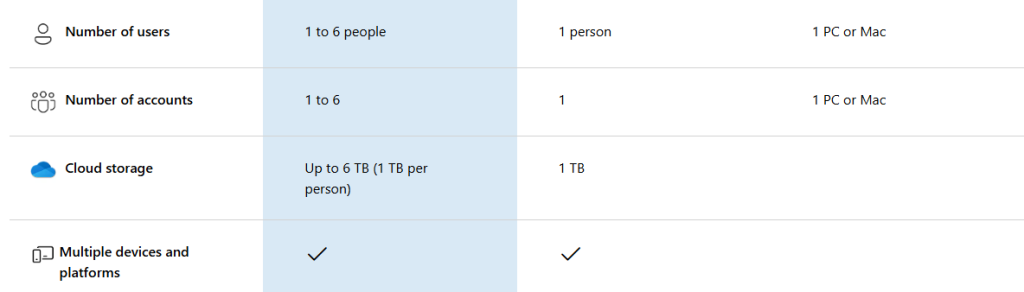
Ideal for individuals and families who need the standard Office apps along with cloud storage and basic collaboration.
Key Features:
- Full access to Word, Excel, PowerPoint, Outlook, and OneNote
- 1 TB OneDrive cloud storage per user
- Access on PC, Mac, tablets, and mobile devices
- Teams for basic collaboration
- Affordable subscription for home and personal use
Who It’s For:
- Students, freelancers, and families
- Users who want a simple, complete productivity suite for personal tasks
2. Business Plans
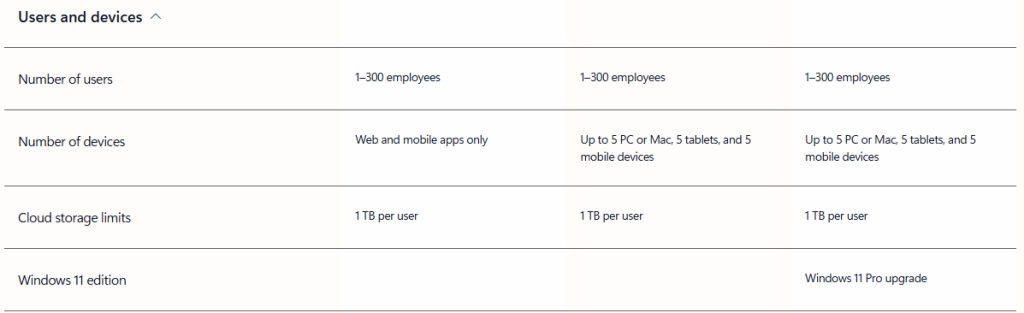
Designed for small and medium businesses (up to 300 users). These plans provide productivity apps, business email, collaboration tools, and optional advanced security.
Business Plan Variants:
► Business Basic
- Web and mobile versions of Office apps
- Business email with a custom domain
- Microsoft Teams, SharePoint, OneDrive
- Cloud-only access, no desktop apps
► Business Standard
- All Basic features plus desktop Office apps
- Ideal for businesses that need installed apps and cloud services
► Business Premium
- All Standard features
- Advanced security, threat protection, and device management
- Perfect for businesses with sensitive data and compliance requirements
Who It’s For:
- Small to medium businesses that need email, collaboration, and cloud storage
- Teams that require security and device management
3. Enterprise Plans
Enterprise plans are for large organizations with unlimited users, compliance needs, and advanced IT requirements.
Key Features:
- Unlimited scalability for users
- Advanced security and threat protection
- Compliance and analytics tools (e.g., Power BI integration)
- Collaboration and communication at enterprise level
Enterprise Plan Tiers
- E1: Web-based apps and services
- E3: Desktop apps plus advanced features
- E5: Full enterprise stack including analytics, security, and telephony
Who It’s For:
- Large organizations with complex IT needs
- Businesses that require enterprise-level security, compliance, and analytics
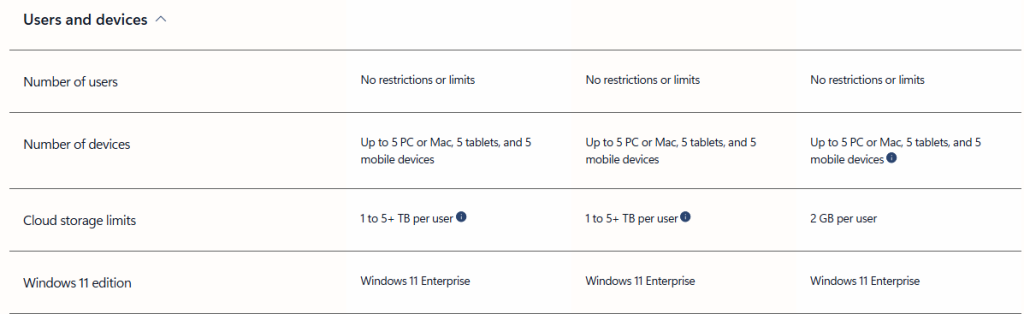
Quick Comparison
Home / Personal • Individuals and families
- Office apps (Word, Excel, PowerPoint, Outlook)
- 1 TB OneDrive storage per user
- Personal productivity and basic collaboration
Business • Small to medium businesses (up to 300 users)
- Business email with custom domain
- Microsoft Teams, SharePoint, OneDrive
- Optional advanced security and device management
Enterprise • Large organizations
- Unlimited users
- Advanced security, compliance, and analytics
- Enterprise-level collaboration and management
Conclusion
Microsoft 365 and Office 365 provide flexible options depending on the user or organization:
- Individuals / Families → Home/Personal plan
- Small/Medium Businesses → Business plans (Basic, Standard, Premium)
- Large Enterprises → Enterprise plans (E1, E3, E5)
When choosing a plan, focus on:
- Number of users
- Need for desktop apps vs web apps
- Collaboration tools
- Security and compliance requirements
Leave a Reply